When a user runs out of archive space (regularly 100GB), and you add a Online Exchange Plan 2 license or another type of license which supports over 100GB of space (Microsoft 365 E3, E5, Office 365 E3, E5), we need to manually enable via Powershell the auto expand option so it can expand more space on the archive.
Connect-ExchangeOnline -UserPrincipalName [email protected]
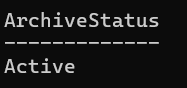
Get-Mailbox -Identity "[email protected]" | Select ArchiveStatus
Should be Active if the archive is active, otherwise we need to enable it:
Enable-Mailbox -Identity "[email protected]" -Archive
Enable auto expanding archive for one user:
Enable-Mailbox -Identity "[email protected]" -AutoExpandingArchive
This is tenant-wide:
Get-Mailbox -RecipientTypeDetails UserMailbox -ResultSize Unlimited | Where {$_.ArchiveStatus -eq "Active"} | Enable-Mailbox -AutoExpandingArchive
Thanks, Microsoft